- Overview
- Configuration
- NTP4 Plug-In
- Hardware
- RFC 868
- RFC 2030
-
RFC 1305
- RFC 1305
- 1. Introduction
- 1.1 Related Technology
- 2. System Architecture
- 2.1 Implementation Model
- 2.2 Network Configurations
- 3. Network Time Protocol
- 3.1 Data Formats
- 3.2 State Variables and Parameters
- 3.2.1 Common Variables
- 3.2.2 System Variables
- 3.2.3 Peer Variables
- 3.2.4 Packet Variables
- 3.2.5 Clock-Filter Variables
- 3.2.6 Authentication Variables
- 3.2.7 Parameters
- 3.3 Modes of Operation
- 3.4 Event Processing
- 3.4.1 Notation Conventions
- 3.4.2 Transmit Procedure
- 3.4.3 Receive Procedure
- 3.4.4 Packet Procedure
- 3.4.5 Clock-Update Procedure
- 3.4.6 Primary-Clock Procedure
- 3.4.7 Initialization Procedures
- 3.4.7.1 Initialization Procedure
- 3.4.7.2 Initialization-Instantiation Procedure
- 3.4.7.3 Receive-Instantiation Procedure
- 3.4.7.4 Primary Clock-Instantiation Procedure
- 3.4.8 Clear Procedure
- 3.4.9 Poll-Update Procedure
- 3.5 Synchronization Distance Procedure
- 3.6 Access Control Issues
- 4. Filtering and Selection Algorithms
- 4.1 Clock-Filter Procedure
- 4.2 Clock-Selection Procedure
- 4.2.1 Intersection Algorithm
- 4.2.2. Clustering Algorithm
- 5. Local Clocks
- 5.1 Fuzzball Implementation
- 5.2 Gradual Phase Adjustments
- 5.3 Step Phase Adjustments
- 5.4 Implementation Issues
- 6. Acknowledgments
- 7. References
- Appendix A
- Appendix B
- Appendix C
- Appendix D
- Appendix E
- Appendix F
- Appendix G
- Appendix H
- Appendix I
- Time Tools
- NTP Auditor
- About
| Previous Top Next |
Windows Time Server
Admin Tab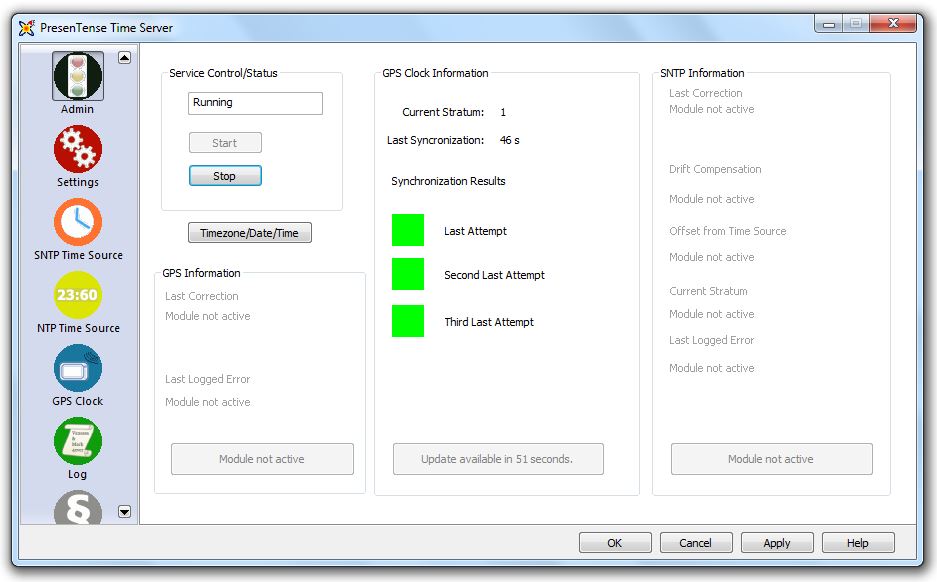
Service Status
This panel indicates if the PresenTense Time Server service is running or stopped. Use the buttons to start and/or stop the service.
Timezone/Date/Time
Use this button to conveniently access Windows date/time functions.
NTP/GPS Clock Information
If NTP Time Source is enabled, information about the NTP time source will be shown. If GPS Time Source is enabled, information about the GPS time source will be shown and if neither are activated then this section is disabled. If activated, the following information is shown:
Current Stratum - The current stratum of PresenTense Time Server
Last Synchronization - How long since PresenTense Time Client synchronized with a time source
Synchronization Results - Shows the result of the last three attempts to synchronize with the upstream time source. Green depicts success whilst red depicts failure
SNTP Information
Only enabled if the SNTP Time Source option is enabled and if available, shows information about the following:
Last Correction - The time and value of the last correction PresenTense Time Client made to the local Windows clock
Drift Compensation - The last noted drift compensation
Offset From Time Source - Shows the last noted difference between the local Windows clock and the upstream time source
Current Stratum - The current stratum of PresenTense Time Client
Last Logged Error - The last error found in the Windows Application Event Log which was generated by PresenTense Time Client
Note: The Event Logging level should be set to Detailed otherwise some information may not be available.
Making configuration changes through the user interface requires administrator privileges.