- Overview
- Configuration
- NTP4 Plug-In
- Hardware
- RFC 868
- RFC 2030
-
RFC 1305
- RFC 1305
- 1. Introduction
- 1.1 Related Technology
- 2. System Architecture
- 2.1 Implementation Model
- 2.2 Network Configurations
- 3. Network Time Protocol
- 3.1 Data Formats
- 3.2 State Variables and Parameters
- 3.2.1 Common Variables
- 3.2.2 System Variables
- 3.2.3 Peer Variables
- 3.2.4 Packet Variables
- 3.2.5 Clock-Filter Variables
- 3.2.6 Authentication Variables
- 3.2.7 Parameters
- 3.3 Modes of Operation
- 3.4 Event Processing
- 3.4.1 Notation Conventions
- 3.4.2 Transmit Procedure
- 3.4.3 Receive Procedure
- 3.4.4 Packet Procedure
- 3.4.5 Clock-Update Procedure
- 3.4.6 Primary-Clock Procedure
- 3.4.7 Initialization Procedures
- 3.4.7.1 Initialization Procedure
- 3.4.7.2 Initialization-Instantiation Procedure
- 3.4.7.3 Receive-Instantiation Procedure
- 3.4.7.4 Primary Clock-Instantiation Procedure
- 3.4.8 Clear Procedure
- 3.4.9 Poll-Update Procedure
- 3.5 Synchronization Distance Procedure
- 3.6 Access Control Issues
- 4. Filtering and Selection Algorithms
- 4.1 Clock-Filter Procedure
- 4.2 Clock-Selection Procedure
- 4.2.1 Intersection Algorithm
- 4.2.2. Clustering Algorithm
- 5. Local Clocks
- 5.1 Fuzzball Implementation
- 5.2 Gradual Phase Adjustments
- 5.3 Step Phase Adjustments
- 5.4 Implementation Issues
- 6. Acknowledgments
- 7. References
- Appendix A
- Appendix B
- Appendix C
- Appendix D
- Appendix E
- Appendix F
- Appendix G
- Appendix H
- Appendix I
- Time Tools
- NTP Auditor
- About
| Previous Top Next |
Windows Time Server
Free Run SupportMost clocks lose or gain time so within a few days they no longer display the correct time. In the days of old, grandfather would wind up the family clock once every couple of days and where appropriate, adjust the hands of the clock to reflect the correct time. If grandfather found that the clock was too slow or too fast by a constant number of minutes every day, he would adjust the clock pendulum so as to correct the clock speed.

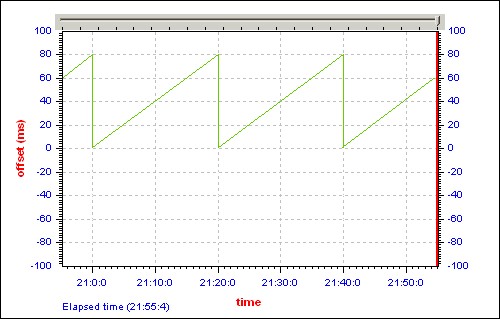
Most network time synchronization software restricts itself to the equivalent of "adjusting the hands" at certain intervals. Thus the longer the time between adjustments, the greater the cumulative error, or offset, will be. This effect is illustrated below. The graph shows the clock offset accumulating as the clock slowly drifts away from the correct time. Then an adjustment is made, thereby correcting the offset and the cycle begins anew.
Depending on your time keeping requirements, the accumulated offset between adjustments may exceed the maximum acceptable value. Public Safety Answering Points (PSAP) such as 911 call centers, for example, are required by their governing body NENA to maintain a continuous accuracy of 100 milliseconds when synchronizing to the reference time source.
Thus, in order to effect continuous accuracy, it is not sufficient to adjust the system time at certain intervals, it is also necessary to correct the system clock speed. Once your computer system clock speed itself is correct, it is only necessary to verify correct time at certain intervals and make minimal corrections where required. Your computer may now "free run" without access to its reference time source and without accumulating a large error between time checks.
PresenTense Time Server features free run support when synchronizing to network time sources both in SNTP mode as well as NTP mode. PresenTense Time Server achieves this by first measuring the average offset or clock drift between adjustment intervals and then adjusting the operating system clock speed accordingly. Both the client and server editions of PresenTense time software support free run operation on the following operating systems: Windows NT, Windows 2000, Windows XP and Windows 2003, Windows XP and Windows Vista, Windows 7,8,10 plus server variants of all. These operating systems allow micro management of the system clock via access to the clock interrupt which typically occurs every ten milliseconds. At every clock interrupt, time may be added or subtracted with 100 nanosecond precision, thus correcting the overall system clock speed.
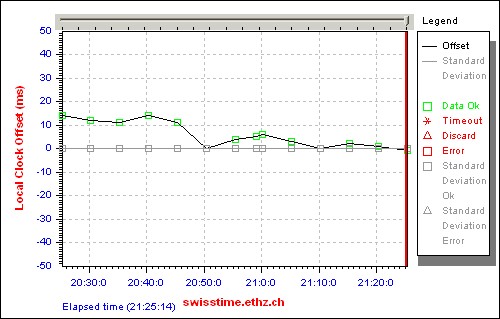
The benefits of free run support are illustrated below. The image shows an actual PresenTense NTP Auditor graph on a 50 millisecond scale as PresenTense Time Server progressively refines the system clock speed on a typical desktop system.
Free run support is enabled by default when operating in the following modes :
1)
Settings Tab: Click SNTP Time Source in the Reference Time Source box.
SNTP Time Source tab: Click NTP/SNTP in the Time Source Type box. Enter reference time servers as appropriate.
2)
Settings Tab: Click NTP Time Source in the Reference Time Source box.
NTP4 Time Source tab: Enter reference time servers as appropriate.
Trademarks:
Windows is a registered trademark of Microsoft Corporation. No associations are implied.