- Overview
- Configuration
- NTP4 Plug-In
- Hardware
- RFC 868
- RFC 2030
-
RFC 1305
- RFC 1305
- 1. Introduction
- 1.1 Related Technology
- 2. System Architecture
- 2.1 Implementation Model
- 2.2 Network Configurations
- 3. Network Time Protocol
- 3.1 Data Formats
- 3.2 State Variables and Parameters
- 3.2.1 Common Variables
- 3.2.2 System Variables
- 3.2.3 Peer Variables
- 3.2.4 Packet Variables
- 3.2.5 Clock-Filter Variables
- 3.2.6 Authentication Variables
- 3.2.7 Parameters
- 3.3 Modes of Operation
- 3.4 Event Processing
- 3.4.1 Notation Conventions
- 3.4.2 Transmit Procedure
- 3.4.3 Receive Procedure
- 3.4.4 Packet Procedure
- 3.4.5 Clock-Update Procedure
- 3.4.6 Primary-Clock Procedure
- 3.4.7 Initialization Procedures
- 3.4.7.1 Initialization Procedure
- 3.4.7.2 Initialization-Instantiation Procedure
- 3.4.7.3 Receive-Instantiation Procedure
- 3.4.7.4 Primary Clock-Instantiation Procedure
- 3.4.8 Clear Procedure
- 3.4.9 Poll-Update Procedure
- 3.5 Synchronization Distance Procedure
- 3.6 Access Control Issues
- 4. Filtering and Selection Algorithms
- 4.1 Clock-Filter Procedure
- 4.2 Clock-Selection Procedure
- 4.2.1 Intersection Algorithm
- 4.2.2. Clustering Algorithm
- 5. Local Clocks
- 5.1 Fuzzball Implementation
- 5.2 Gradual Phase Adjustments
- 5.3 Step Phase Adjustments
- 5.4 Implementation Issues
- 6. Acknowledgments
- 7. References
- Appendix A
- Appendix B
- Appendix C
- Appendix D
- Appendix E
- Appendix F
- Appendix G
- Appendix H
- Appendix I
- Time Tools
- NTP Auditor
- About
| Previous Top Next |
Windows Time Server
NTP4 Plug-In Driver CalibrationGPS and radio clocks communicating with your server via a serial port connection are subject to serial port delays and other operating system dependent propagation errors. In some cases long antenna cables may introduce further signal propagation delays. For this reason it is important to calibrate your clock for use with your time server.
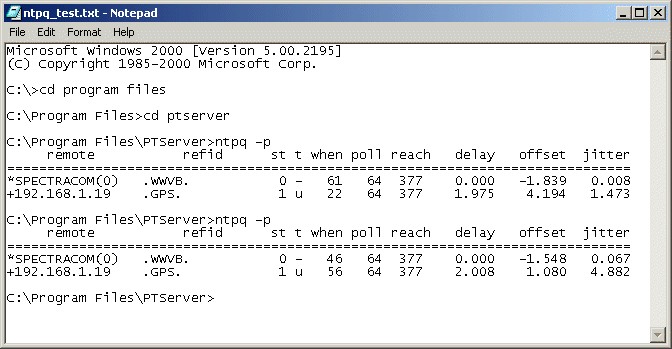
NTP driver calibration is easiest achieved using the NTP4 Query Command Line Tool.
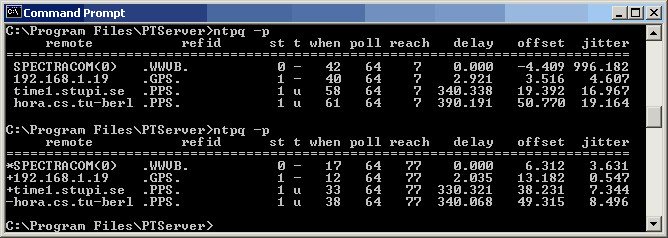
The screenshot above shows a test system running a Spectracom 8189 clock as primary time source and a local area network NTP server 192.168.1.19 as secondary time source. Two public NTP servers on the internet facilitate external verification of test results. The two servers on the internet are subject to round trip delays on the order of 300ms as well as substantial network jitter and therefore exhibit greater offsets with respect to the local system clock than the local area network NTP server.
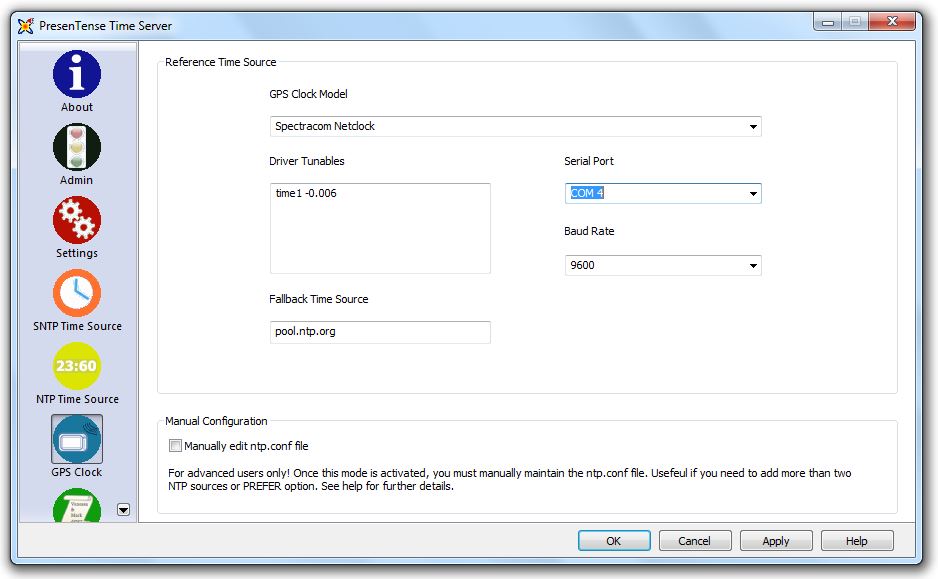
You can use the time1 driver parameter to compensate for signal delays and other propagation errors. The example shown above illustrates how to compensate for a nominal 6 millisecond error. The final screenshot shown below shows both time sources in agreement to within 2.5 milliseconds. Depending on your requirements you might wish to calibrate to within closer specifications.