- Overview
- Configuration
- NTP4 Plug-In
- Hardware
- RFC 868
- RFC 2030
-
RFC 1305
- RFC 1305
- 1. Introduction
- 1.1 Related Technology
- 2. System Architecture
- 2.1 Implementation Model
- 2.2 Network Configurations
- 3. Network Time Protocol
- 3.1 Data Formats
- 3.2 State Variables and Parameters
- 3.2.1 Common Variables
- 3.2.2 System Variables
- 3.2.3 Peer Variables
- 3.2.4 Packet Variables
- 3.2.5 Clock-Filter Variables
- 3.2.6 Authentication Variables
- 3.2.7 Parameters
- 3.3 Modes of Operation
- 3.4 Event Processing
- 3.4.1 Notation Conventions
- 3.4.2 Transmit Procedure
- 3.4.3 Receive Procedure
- 3.4.4 Packet Procedure
- 3.4.5 Clock-Update Procedure
- 3.4.6 Primary-Clock Procedure
- 3.4.7 Initialization Procedures
- 3.4.7.1 Initialization Procedure
- 3.4.7.2 Initialization-Instantiation Procedure
- 3.4.7.3 Receive-Instantiation Procedure
- 3.4.7.4 Primary Clock-Instantiation Procedure
- 3.4.8 Clear Procedure
- 3.4.9 Poll-Update Procedure
- 3.5 Synchronization Distance Procedure
- 3.6 Access Control Issues
- 4. Filtering and Selection Algorithms
- 4.1 Clock-Filter Procedure
- 4.2 Clock-Selection Procedure
- 4.2.1 Intersection Algorithm
- 4.2.2. Clustering Algorithm
- 5. Local Clocks
- 5.1 Fuzzball Implementation
- 5.2 Gradual Phase Adjustments
- 5.3 Step Phase Adjustments
- 5.4 Implementation Issues
- 6. Acknowledgments
- 7. References
- Appendix A
- Appendix B
- Appendix C
- Appendix D
- Appendix E
- Appendix F
- Appendix G
- Appendix H
- Appendix I
- Time Tools
- NTP Auditor
- About
| Top Next |
Windows Time Server
What is PresenTense Time Server

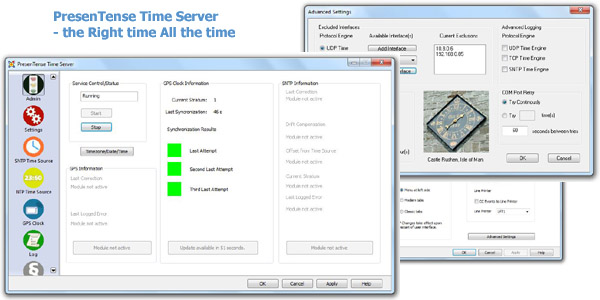
PresenTense Time Server - Advantages at a glance
Accurate and reliable ( microsecond accuracy, 24/7 availability )
Supports Free Run to keep your clock correct even when a time server is not available
Easy to install and maintain ( most users up and running in less than a minute )
Versatile ( able to use almost any reference time source including GPS and internet time servers )
Email and SysLog alarm action to facilitate centralized early warning of error conditions
Low total cost of ownership ( support included meaning no yearly support fees )
True Windows System Service ( runs on all Windows from Windows NT - Windows 10 and beyond )
In a hurry to get up and running, try our NowTo.
Instant Download!PresenTense Time Server is a multi protocol Windows time server which synchronizes itself with any true time source and then acts as a server for all network clients. It is easy to set up but has powerful configuration settings for networks which require a high degree of accuracy. This means you can use PresenTense Time Server to synchronize your PC to a primary time source such as an atomic clock on the internet and offer time services to clients on your local area network. PresenTense Time Server also allows synchronization to GPS receivers via RS-232 and the NMEA 0183 protocol. PresenTense Time Server ships with drivers for many reference clocks including Spectracom and Hopf. If you need an accurate, inexpensive and reliable time server, read on!
PresenTense Time Server operates three server components concurrently on the ports shown below :
1. Port 123 UDP ( SNTP - RFC 2030 )
2. Port 37 UDP ( TIME - RFC 868 )
3. Port 37 TCP ( TIME - RFC 868 )
4. Port 123 UDP ( NTP3 / NTP4 - RFC 1305 ) Free Plug-In included in product and demo
This feature enables you to operate time clients on your network using different time protocols simultaneously depending on your requirements for accuracy. The latest version of our NTP4 plug-in for PresenTense Time Server ships free of charge with all PresenTense Time Server software.
PresenTense Time Server features include :
Multi Protocol Support
When operating as a secondary time server, PresenTense Time Server can synchronize to primary, network time servers of the following protocol families :
1. NTP/SNTP
2. Network Time UDP
3. Network Time TCP
GPS Receiver Support
When operating as a primary time server, PresenTense Time Server can synchronize to GPS receivers via the PC's serial port and the NMEA 0183 protocol. In order to be compatible with PresenTense Time Server, GPS receivers must emit the GPRMC or GPGGA NMEA sentence (recommended minimum coordinates) at one or two second intervals. Special support is included for the Garmin GPS 2 Plus and the Garmin 38 hand held GPS receivers. You may use either PresenTense Time Server's native GPS support or the GPS support furnished by the NTP4 plug-in's reference clock support.
Free Run Support
PresenTense Time Server automatically compensates for local system clock drift when operating in NTP or SNTP mode. This ensures maximum clock accuracy when free-running in the event of loss of connectivity to the reference time source.
The National Emergency Number Association (NENA) identifies time keeping requirements for Public Safety Answering Points (PSAP) such as 911 call centers. These requirements include continuous accuracy of 100 milliseconds to UTC when locked to the reference time source and a maximum clock drift or error accumulation of one second pay day when the system must "free run". See also PresenTense NTP Auditor.
Redundancy
An automatic fail-over mechanism switches to a redundant network time source if the primary time source becomes unavailable (only available when synchronizing to a primary network time server).
Email Alarm Action
PresenTense Time Server can notify you by email if the time source becomes unavailable or critical errors are encountered during operation. All types of SMTP AUTH are supported including NTLM, LOGIN, PLAIN, NONE and CRAM-MD5.
SysLog server support
PresenTense Time Server can send messages to a local or remote SysLog server. A text based local copy or messages can be generated in addition to sending to the network based SysLog server.
System Service
PresenTense Time Server operates as a true system service - invisibly in the background. Configuration changes are made via the PresenTense Time Server applet in the system control panel.
Highly Customizable
PresenTense Time Server features some of the most advanced configuration options on the market today. Some are:
SNTP time engine can be set to serve local time instead of GST/UTC
Selective binding. You choose which time services to make available on which interfaces.
Advanced logging for problem solving.
Extreme fault tolerance. COM ports can be set to poll continuously until a GPS clock comes back on-line.
Security
Initial setup and later configuration via the control panel require administrator privileges. This minimizes the risk of tampering with system parameters by unauthorized users.
Remote Monitoring and Administration
PresenTense Time Server may be administered fully by remote and monitored over the network to ensure accurate time keeping. Please check www.bytefusion.com for availability of monitoring software.
Advanced Statistical Filters
Advanced statistical filters ensure that erroneous measurements are discarded, thus avoiding erratic system clock behavior.
Time Zone Specific Reference Clock Selection
PresenTense Time Server automatically selects the most suitable primary reference clock server, based on your time zone configuration and geographic location.
Trademarks
Microsoft Windows is a registered trademark of Microsoft Corporation. No associations are implied.