- Overview
- Configuration
- Technical
-
RFC 1305
- 1. Introduction
- 1.1 Related Technology
- 2. System Architecture
- 2.1 Implementation Model
- 2.2 Network Configurations
- 3. Network Time Protocol
- 3.1 Data Formats
- 3.2 State Variables and Parameters
- 3.3 Modes of Operation
- 3.4 Event Processing
- 3.4.1 Notation Conventions
- 3.4.2 Transmit Procedure
- 3.4.3 Receive Procedure
- 3.4.4 Packet Procedure
- 3.4.5 Clock-Update Procedure
- 3.4.6 Primary-Clock Procedure
- 3.4.7 Initialization Procedures
- 3.4.7.1 Initialization Procedure
- 3.4.7.2 Initialization-Instantiation Procedure
- 3.4.7.3 Receive-Instantiation Procedure
- 3.4.7.4 Primary Clock-Instantiation Procedure
- 3.4.8 Clear Procedure
- 3.4.9 Poll-Update Procedure
- 3.5 Synchronization Distance Procedure
- 3.6 Access Control Issues
- 4. Filtering and Selection Algorithms
- 4.1 Clock-Filter Procedure
- 4.2 Clock-Selection Procedure
- 4.2.1 Intersection Algorithm
- 4.2.2. Clustering Algorithm
- 5. Local Clocks
- 5.1 Fuzzball Implementation
- 5.2 Gradual Phase Adjustments
- 5.3 Step Phase Adjustments
- 5.4 Implementation Issues
- 6. Acknowledgments
- 7. References
- Appendix A
- Appendix B
- Appendix C
- Appendix D
- Appendix E
- Appendix F
- Appendix G
- Appendix H
- Appendix I
- About
- Time Tools
| Previous Top Next |
Windows Time Client
Network Time SynchronizationA typical network time synchronization scenario is depicted in the diagram shown below.
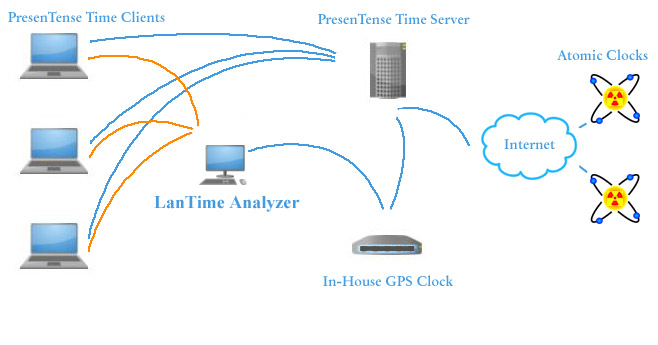
Each workstation running PresenTense Time Client synchronizes to a central PresenTense Time Server on the corporate LAN. This guarantees a coherent propagation of time to all clients. The corporate time server synchronizes to one or more local GPS Master Clocks and also has the backup option of synchronizing to a time server on the internet using the Network Time Protocol. With the correct time set on the computer running PresenTense Time Server, this computer can offer time services to clients/workstations as well as other devices which support the NTP protocol. Such devices can be routers, switches, storage devices as well as security and door access systems. Time services may be offered according to one or more of the common time protocols depending on the accuracy desired.
Centralized Monitoring, Management and Configuration
In the diagram above, the computer marked as LanTime Analyzer is running PresenTense Time Client but also LanTime Analyzer which does the following:
Monitoring - The orange lines depict LanTime Analyzer polling the PresenTense Time Client regularly to check the time
Management - Remote PresenTense Time Clients can be restarted, added and deleted to the database
Configuration - Many parameters can be set on the remote PresenTense Time Clients using LanTime Analyzer
PresenTense Time Client
PresenTense Time Client operates as a true system service all Windows operating systems later than Windows NT to synchronize their system clocks to a corporate time server.
PresenTense Time Server
Although a corporate time server is not necessary, it is recommended. Disadvantages with configuring each time client to synchronize to internet based time servers are:
1. Increased bandwidth demands and costs
2. Due to traffic, some time servers block a site which has too many clients synchronizing
3. Less coherent time across LAN due to internet delays
GPS Master Clock
For optimum security and accuracy, a GPS Master Clock connected to PresenTense Time Server is recommended as the primary time source for PresenTense Time Clients. The advantages of this are:
1. Secure, no need for access through corporate firewalls
2. Operates in environments where no internet access is available
3. More accurate as internet jitter is eliminated
4. Fault tolerant as there are no external dependencies