- Overview
- Configuration
- Technical
-
RFC 1305
- 1. Introduction
- 1.1 Related Technology
- 2. System Architecture
- 2.1 Implementation Model
- 2.2 Network Configurations
- 3. Network Time Protocol
- 3.1 Data Formats
- 3.2 State Variables and Parameters
- 3.3 Modes of Operation
- 3.4 Event Processing
- 3.4.1 Notation Conventions
- 3.4.2 Transmit Procedure
- 3.4.3 Receive Procedure
- 3.4.4 Packet Procedure
- 3.4.5 Clock-Update Procedure
- 3.4.6 Primary-Clock Procedure
- 3.4.7 Initialization Procedures
- 3.4.7.1 Initialization Procedure
- 3.4.7.2 Initialization-Instantiation Procedure
- 3.4.7.3 Receive-Instantiation Procedure
- 3.4.7.4 Primary Clock-Instantiation Procedure
- 3.4.8 Clear Procedure
- 3.4.9 Poll-Update Procedure
- 3.5 Synchronization Distance Procedure
- 3.6 Access Control Issues
- 4. Filtering and Selection Algorithms
- 4.1 Clock-Filter Procedure
- 4.2 Clock-Selection Procedure
- 4.2.1 Intersection Algorithm
- 4.2.2. Clustering Algorithm
- 5. Local Clocks
- 5.1 Fuzzball Implementation
- 5.2 Gradual Phase Adjustments
- 5.3 Step Phase Adjustments
- 5.4 Implementation Issues
- 6. Acknowledgments
- 7. References
- Appendix A
- Appendix B
- Appendix C
- Appendix D
- Appendix E
- Appendix F
- Appendix G
- Appendix H
- Appendix I
- About
- Time Tools
| Previous Top Next |
Windows Time Client
Advanced Settings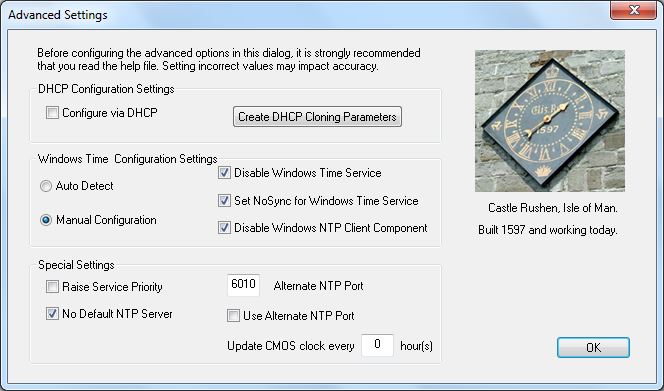
Configure this client via DHCP
PresenTense Time Client can be configured to retrieve it's settings from a DHCP server on your network. This allows network administrators to centrally manage the client configuration parameters. It also reduces the overhead in rolling out a large number of clients on a network. Remote installation (via Microsoft SMS or similar) can be used to simply install the service and place the files in the appropriate directories. PresenTense Time Client then fetches it's running configuration from a DHCP server upon startup. See Configuring via DHCP for details on how to set up your server and the list of options you can set via DHCP.
Note: If desired, you can disable this feature either via unchecking this checkbox or via DHCP. This flexible feature allows network administrators to configure via DHCP only the first time PresenTense Time Client starts. Settings are stored permanently in the registry and no further DHCP configuration is possible until the checkbox is manually cleared or the corresponding registry key is reset. You can even configure via DHCP once and set the option to not configure via DHCP in the future as part of that configuration. This allows for a "once only" DHCP configuration of PresenTense Time Client. See Configuring via DHCP for detailed instructions.
Create DHCP Cloning Parameters
The easiest way to centrally manage PresenTense Time Client parameters is via DHCP. Combined with Remote Installation, PresenTense Time Clients can be installed unattended and centrally managed. Once you have configured one PresenTense Time Client, click the Create DHCP Cloning Parameters button and the values to configure on your DHCP server will be shown. See Configuring via DHCP for detailed instructions.
Automatic Windows Time Configuration
PresenTense Time Client support automatic or manual configuration of the Windows Time Service. Some software requires that the Windows Time Service is running and will fail to start if it is not. Active Directory, Domain Controllers, Microsoft Cluster Servers and SQL Cluster Servers are among these. Windows Time Service interferes with PresenTense Time Client if left in it's default state. If you choose Automatic, PresenTense Time Client will attempt to detect products which require Windows Time Service to be running and reconfigure itself and Windows Time to facilitate parallel operation. When Automatic is chosen, the manual settings are not available. If auto-detect fails, it will reconfigure PresenTense Time Client and Windows Time Service by default. If you are certain you don't have any services which require Windows Time then you can manually disable it. See Manual Windows Time Configuration below.
Manual Windows Time Configuration
If you have a product which requires Windows Time Service to be running but it is not detected in Automatic mode, check the Manual button and the manual configuration options will be enabled.
Disable Windows Time Service : Disables or enables the Windows Time Service
Set NoSync for Windows Time Service : Sets the no synchronization flag. Windows Time Service does not synchronize to any time source.
Disable Windows NTP Client Component : Windows Time Service is made up of a server and a time client component. Disabling the client component means Windows Time Service will not try to manage the Windows clock.
Alternate NTP Port : If enabling the Windows NTP Time Service, you will need to set PresenTense Time Client to use an alternate port so as to avoid clashes with the Windows Time Service. The default alternate port is 6011 however any free port above 5000 can be used. Ensure you choose the Use Alternate NTP Port option as well.
Recommended Manual configuration settings.
Disable Windows Time Service : Unchecked
Set NoSync for Windows Time Service : Checked
Disable Windows NTP Client Component : Checked
Alternate NTP Port : 6011
Use Alternate NTP Port: Checked
Raise Service Priority
The Priority Boost setting allows you to increase the real-time priority of PresenTense Time Server in the context of the Microsoft Windows operating system. Tasks with a higher priority receive a greater share of CPU attention. If your system runs many CPU intensive applications, use the "Priority Class High" setting to enhance the accuracy of PresenTense Time Server.
No Default NTP Server
By default if you choose NTP Time Source or GPS Clock without setting a Fallback, PresenTense Time Client will enter a default server for you. Sometimes this is not desirable and can cause alarm messages when operated behind a firewall. Choose this option to stop a default server being entered.
Update CMOS clock every
The CMOS/BIOS clocks on many motherboards can drift while Windows is in operating. This causes a problem when the operating system is rebooted as it uses the drifted time until synchronization is achieved. To minimize the drift, PresenTense Time Server can update the CMOS/BIOS clock at regular intervals where the interval is in hours.
Note: This problem is only experienced in NTP Time Source mode and only with very accurate GPS clock sources which are locally attached. If you are using SNTP Time Source mode or have a less accurate GPS clock source then it is not necessary to set this.