- Introduction
- Configuration
- Keys
-
Email Clients
- Basic Email Client Configuration
- Outlook XP/2002
- Modifying Outlook XP/2002
- Outlook 98/2000/Express
- Modifying Outlook 98/2000/Express
- The BAT
- Modifying The BAT
- Pegasus
- Modifying Pegasus
- Eudora
- Modifying Eudora
- Calypso
- Modifying Calypso
- IncrediMail
- Modifying IncrediMail
- Netscape Mail
- Modifying Netscape Mail
- Technical
-
FAQ
- What email clients work with SecExMail ?
- Does SecExMail work with IMAP?
- How secure are SecexMail keys ?
- Is SecExMail legal in my country ?
- Does SecExMail support signatures ?
- Does SecExMail work with PGP ?
- Is the source code available for SecExMail ?
- Why can I not mix clear text and cipher recipients ?
- About
| Previous Top Next |
Email Encryption for Windows
Modifying Netscape Mail
To modify an existing Netscape mail account for use with SecExMail, please follow the steps detailed below.
| Step 1 |
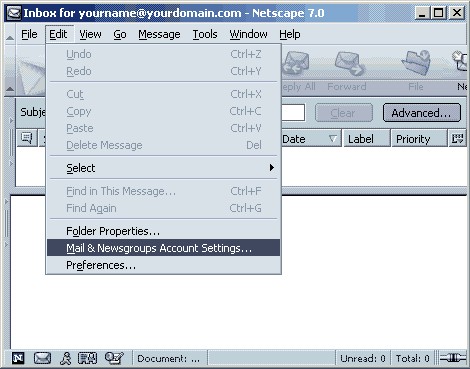
Open Netscape Mail and click on Edit > Mail & Newsgroups Account Settings.
| Step 2 |
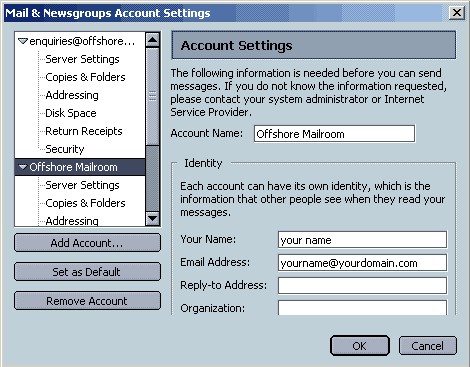
A pop-up menu will appear. Select the account you wish to modify.
| Step 3 |
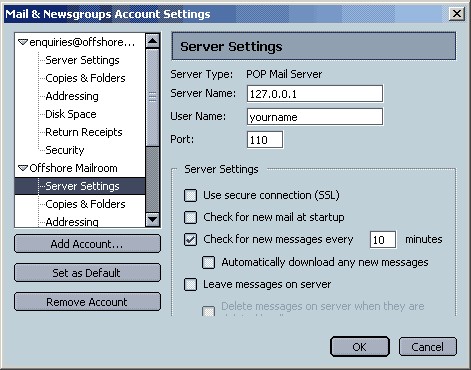
Select Server Settings and in the server name box enter 127.0.0.1
| Step 4 |
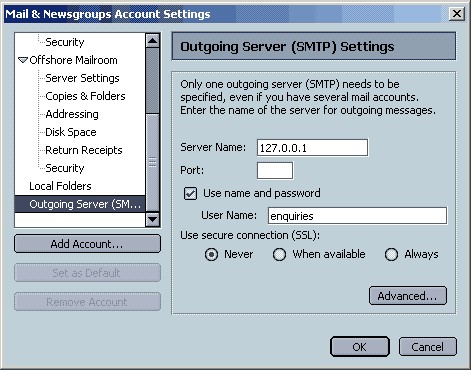
Select Outgoing Server (SMTP). In the Server Name box enter 127.0.0.1. Click OK to finish.